Fraud Prevention & Compliance
Driving sales momentum with the new API Explorer.
Driving sales momentum with the new API Explorer.
Driving sales momentum with the new API Explorer.
To revamp the platform to make our 160+ trust and security APIs easy to discover and use, accelerating inbound conversions and proving Bureau is the fastest path to profit.
To revamp the platform to make our 160+ trust and security APIs easy to discover and use, accelerating inbound conversions and proving Bureau is the fastest path to profit.
To revamp the platform to make our 160+ trust and security APIs easy to discover and use, accelerating inbound conversions and proving Bureau is the fastest path to profit.
Complexity vanished, revenue returned.
Complexity vanished, revenue returned.
Complexity vanished, revenue returned.
Analysts, Fraud Risk Managers, Compliance Managers, Developers
Product & Visual Designer
Chatgpt, Figma, Jira, Google Meet
User Interviews, Journey Map, Competitor Analysis, Wireframes, Design Reviews, UI Design, Usability Testing
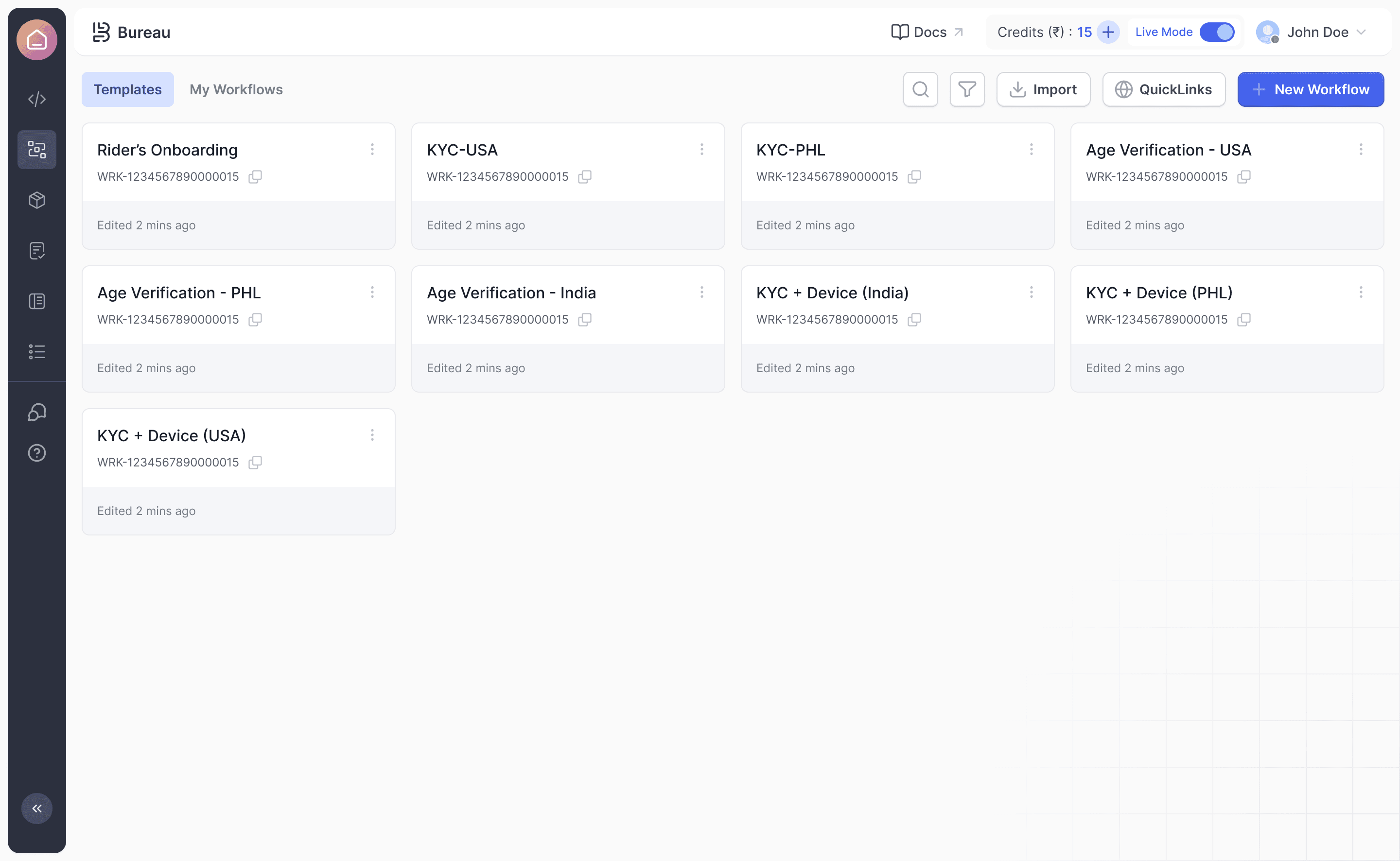
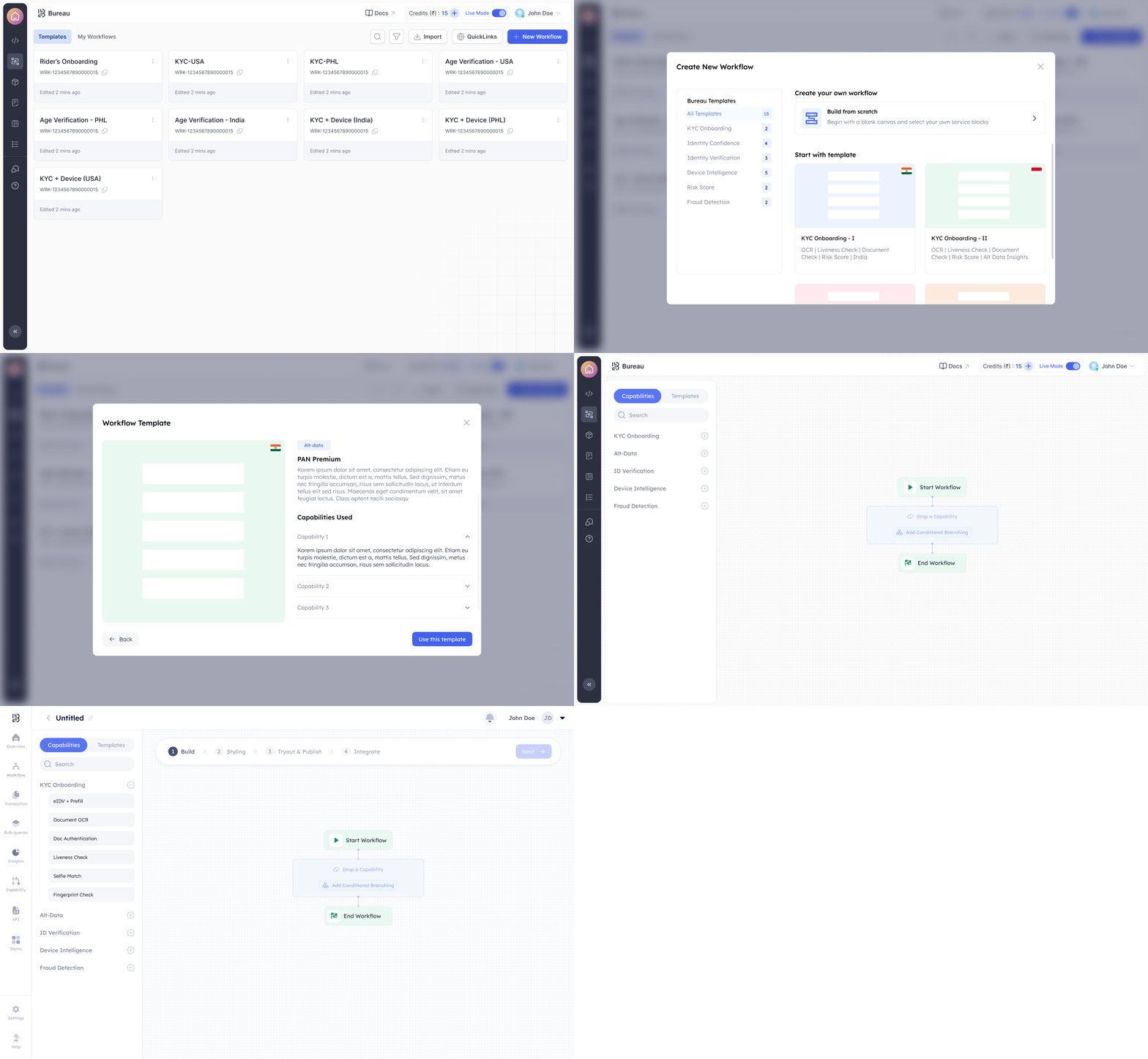
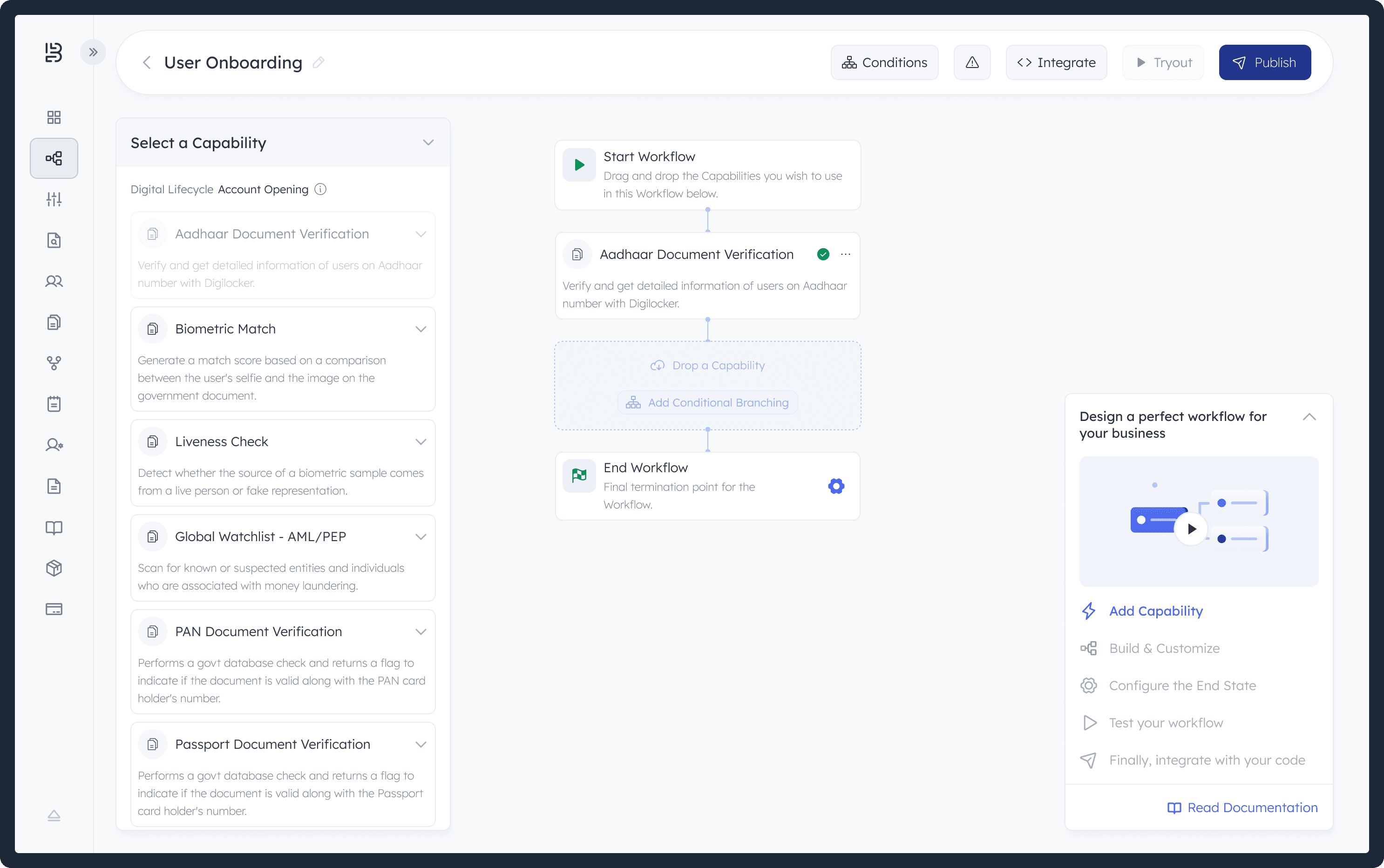
Users report that our workflow module feels unclear, complex, and inefficient. A steep learning curve, unintuitive flow, and misalignment with user needs are limiting their ability to create workflows smoothly.
Onboarding, capability exploration, workflow creation, and testing all lack the user-friendliness required for fast adoption.
The current UX is slowing users down, impacting efficiency, satisfaction, and overall product value, creating a clear need for a redesigned, intuitive workflow experience.
Our interviews showed that users struggle to understand and navigate the current workflow. New users face unclear guidance, while experienced users are slowed by unnecessary complexity and an unintuitive structure.
They also find it hard to discover capabilities, set up workflows correctly, and validate their configurations, leading to confusion, backtracking, and reliance on support.
Understand how users currently find and interpret available APIs, nodes, and capabilities.
Understand how users currently find and interpret available APIs, nodes, and capabilities.
Understand how users currently find and interpret available APIs, nodes, and capabilities.
Identify which features or functions users fail to notice or misunderstand.
Identify which features or functions users fail to notice or misunderstand.
Identify which features or functions users fail to notice or misunderstand.
Learn how users expect important actions or components to be surfaced within the workflow builder.
Learn how users expect important actions or components to be surfaced within the workflow builder.
Learn how users expect important actions or components to be surfaced within the workflow builder.
Evaluate whether users can easily differentiate between similar capabilities or know when to use them.
Evaluate whether users can easily differentiate between similar capabilities or know when to use them.
Evaluate whether users can easily differentiate between similar capabilities or know when to use them.
These are the success benchmarks that ensure the redesign delivers meaningful impact across discoverability, usability, and sales acceleration.
Success is when users immediately understand how to explore the API ecosystem, navigate the interface with ease, and start testing APIs without needing external guidance.
Exploration
Victory is when users can quickly find the right API by country, category, use case, or capability and clearly understand what each API does without feeling lost or overwhelmed.
We succeed when users can easily read descriptions, inputs, outputs, pricing, and coverage details, and gain a clear mental model of how each API fits their needs.
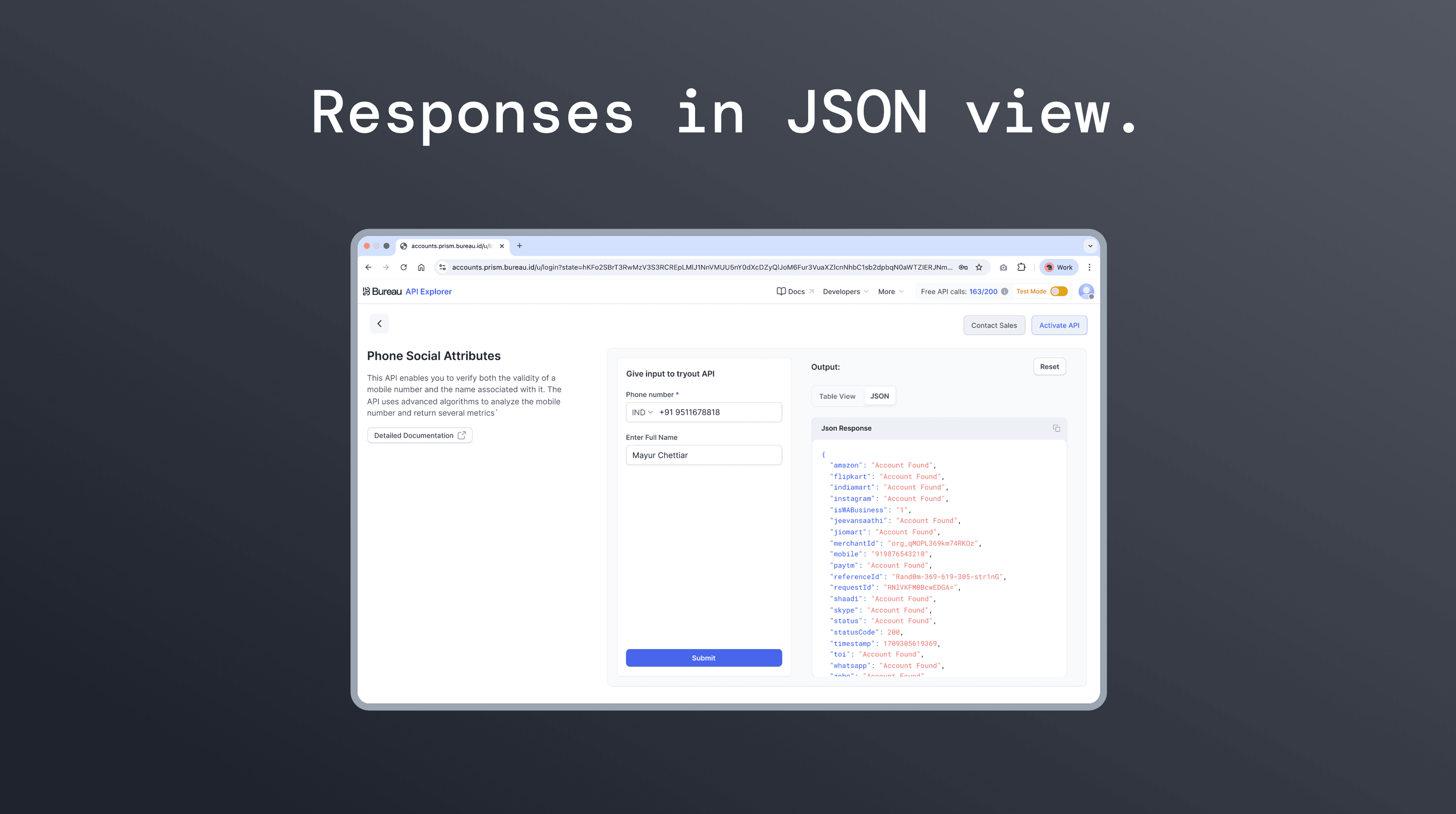
Testing is successful when users can try any API with real-time data, switch between JSON and table views, and interpret results without confusion.
Victory is when users can confirm an API’s relevance, reliability, and accuracy on their own, reducing the need for demos, support, or custom walkthroughs.
Number of in-editor workflow tests before code integration.
Number of successful troubleshooting attempts based on error messages.
Number of errors triggered and resolved by users.
Reduced workflow and transaction switching during testing.
Based on the API Explorer structure, we mapped out the user journey for discovering, understanding, and testing APIs. The goal is to create a seamless path that helps users explore API capabilities quickly and confidently.
1. Enter API Explorer
Touchpoint: API Explorer home
Pain Point: Overwhelming number of APIs
User Question: Where do I begin?
1. Discover Bureau.id
Touchpoint: Marketing channels, referrals, website
Pain Point: Difficulty finding relevant information
User Question: What does Bureau.id offer for my business?
1. Discover Bureau.id
Touchpoint: Marketing channels, referrals, website
Pain Point: Difficulty finding relevant information
User Question: What does Bureau.id offer for my business?
2. Find the Right API
Touchpoint: Categories, search, and API list table
Pain Point: Hard to locate the relevant API
User Question: Which API fits my country, use case, or pricing needs?
2. Signing Up
Touchpoint: Sign-up form, documentation
Pain Point: Confusing sign-up process
User Question: How do I sign up? Where's the documentation?
2. Signing Up
Touchpoint: Sign-up form, documentation
Pain Point: Confusing sign-up process
User Question: How do I sign up? Where's the documentation?
Open API Details
Touchpoint: API details and supporting information
Pain Point: Difficulty understanding descriptions and coverage
User Question: What does this API do and is it right for me?
Read Overview
Touchpoint: Documentation content
Pain Point: Overwhelming information
User Question: What are the key concepts?
Read Overview
Touchpoint: Documentation content
Pain Point: Overwhelming information
User Question: What are the key concepts?
Try the API
Touchpoint: Demo page with input fields
Pain Point: Unsure what data to enter
User Question: How do I test this API with valid inputs?
Workflow Components
Touchpoint: Workflow documentation
Pain Point: Complex terminology
User Question: How do these components apply to KYC Onboarding?
Workflow Components
Touchpoint: Workflow documentation
Pain Point: Complex terminology
User Question: How do these components apply to KYC Onboarding?
View and Interpret Results
Touchpoint: JSON and table responses
Pain Point: Results are hard to interpret
User Question: What does the response mean for my use case?
Study KYC Onboarding
Touchpoint: Examples and use cases
Pain Point: Unclear examples
User Question: How can I customize examples for my needs?
Study KYC Onboarding
Touchpoint: Examples and use cases
Pain Point: Unclear examples
User Question: How can I customize examples for my needs?
Export or Continue Testing
Touchpoint: Download report or retry inputs
Pain Point: Confusion about next steps
User Question: How do I save this test or run more checks?
Custom KYC Workflow
Touchpoint: Platform interface
Pain Point: Complex interface
User Question: How do I create a custom workflow?
Custom KYC Workflow
Touchpoint: Platform interface
Pain Point: Complex interface
User Question: How do I create a custom workflow?
Drawing from user interviews and journey mapping, we created detailed personas that clarified our target users and their needs.
I compare multiple APIs to decide which ones meet our compliance and regional requirements. I get stuck when information like supported countries, pricing, or inputs is buried, so I depend on an explorer that helps me quickly filter and narrow down options.
Risk & Compliance Analyst
Swipe the card
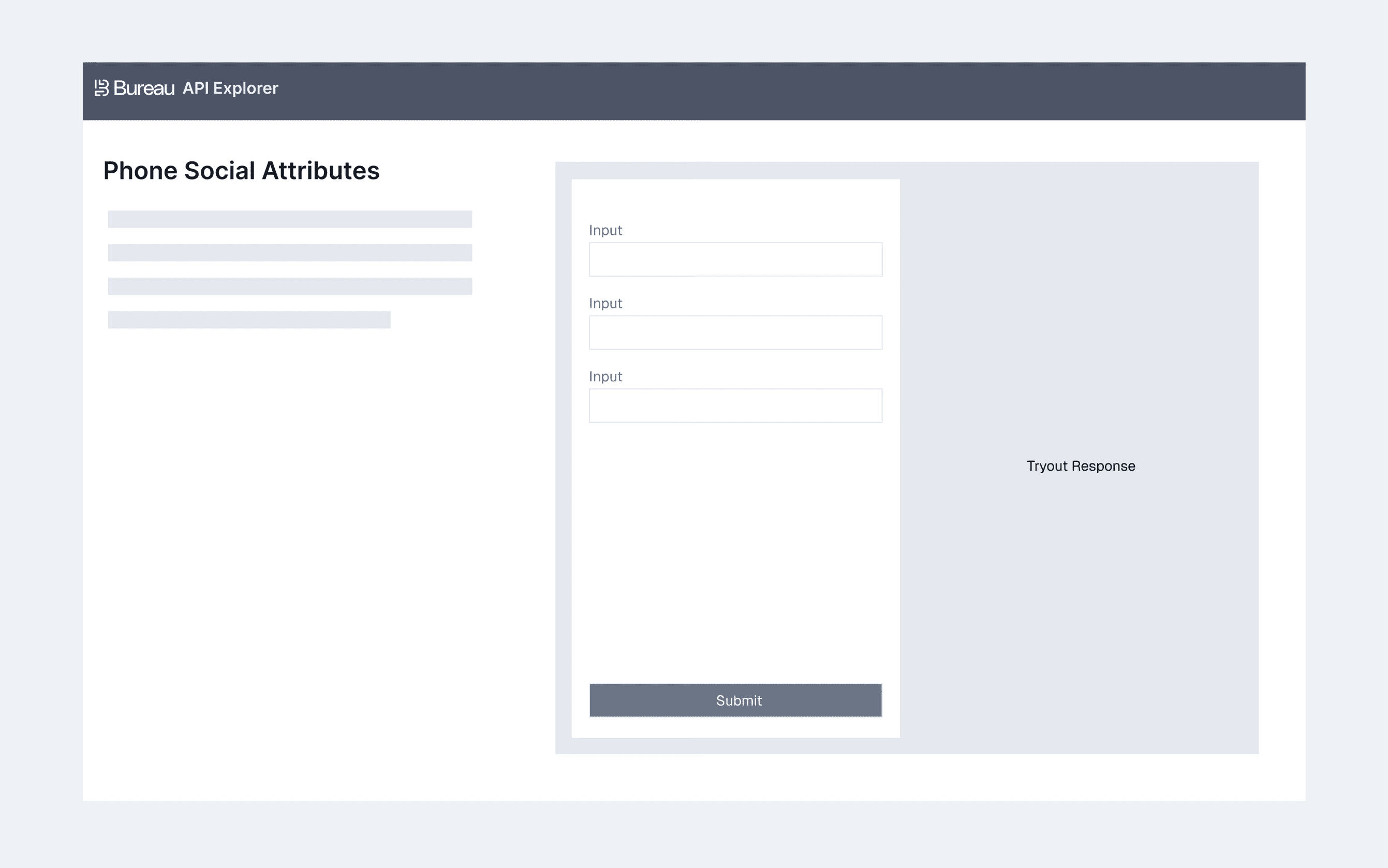
Low-fidelity sketches focused on simple navigation, key filters, and modular components to ensure intuitive API exploration and demo flow.
We believe this redesign solves key pain points and delivers a more intuitive, efficient experience.
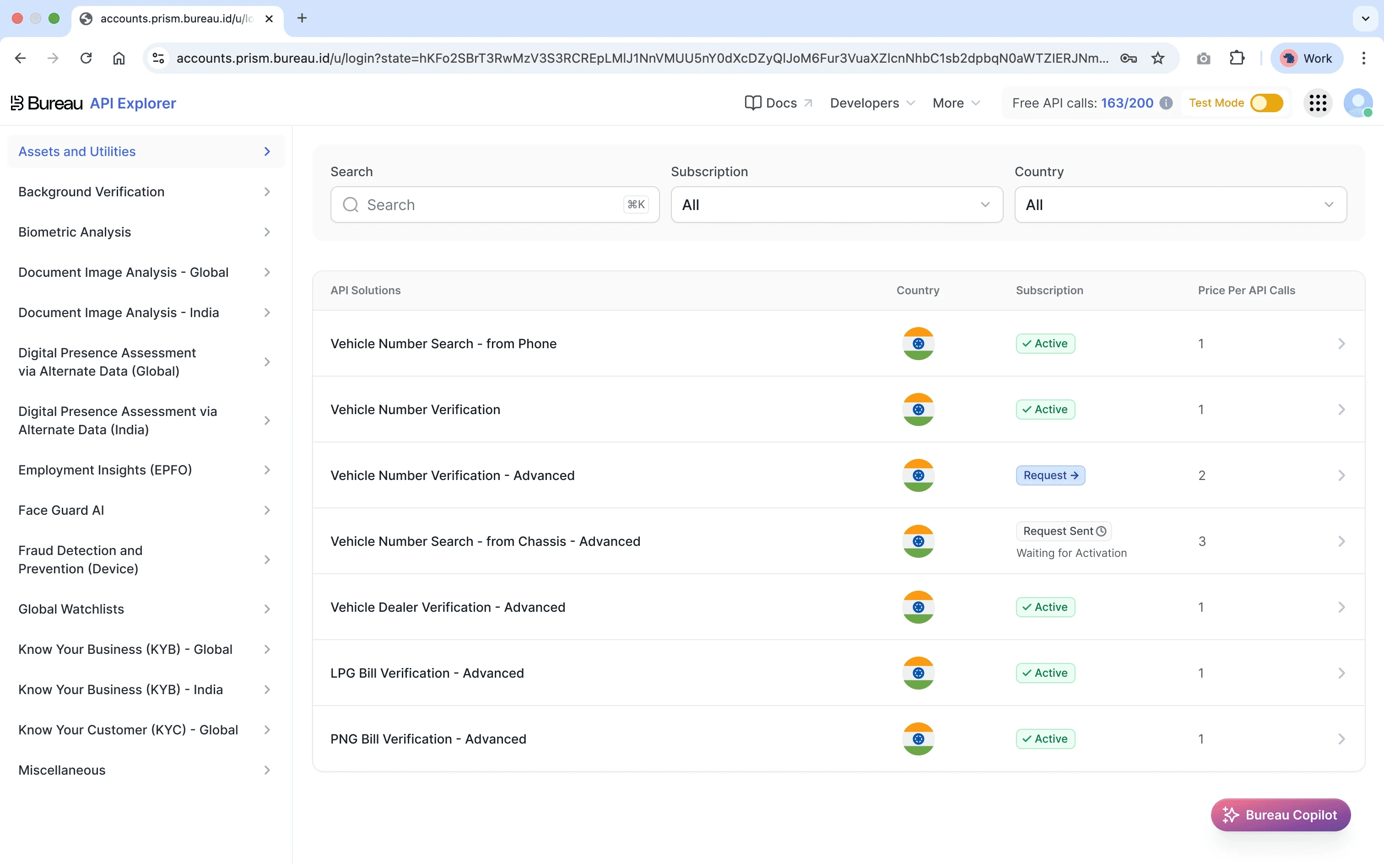
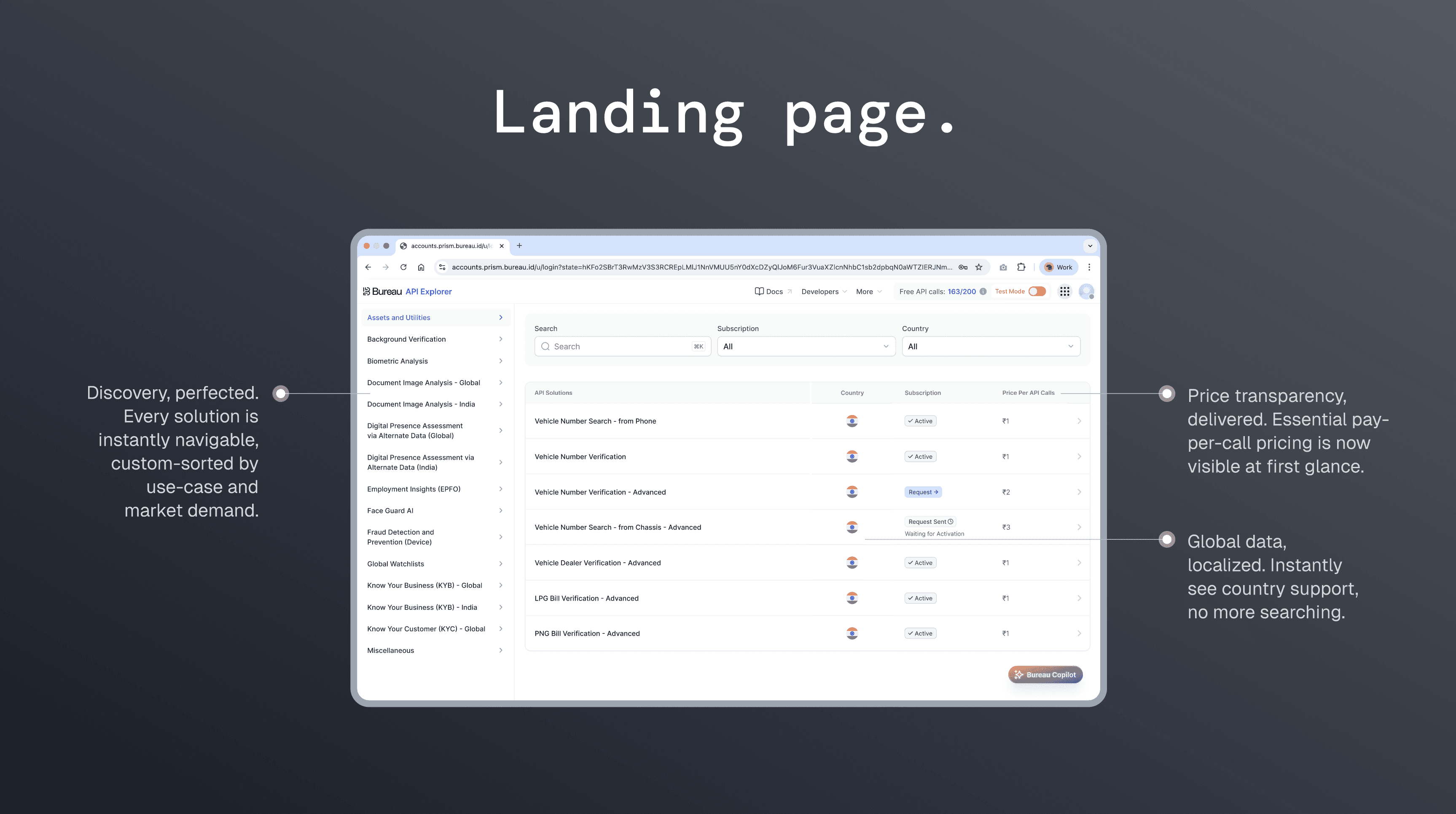
A clear starting point for exploration. Users can instantly browse all APIs through organized categories on the left, while the table on the right updates in real time to show essential details like supported countries, pricing, and availability.
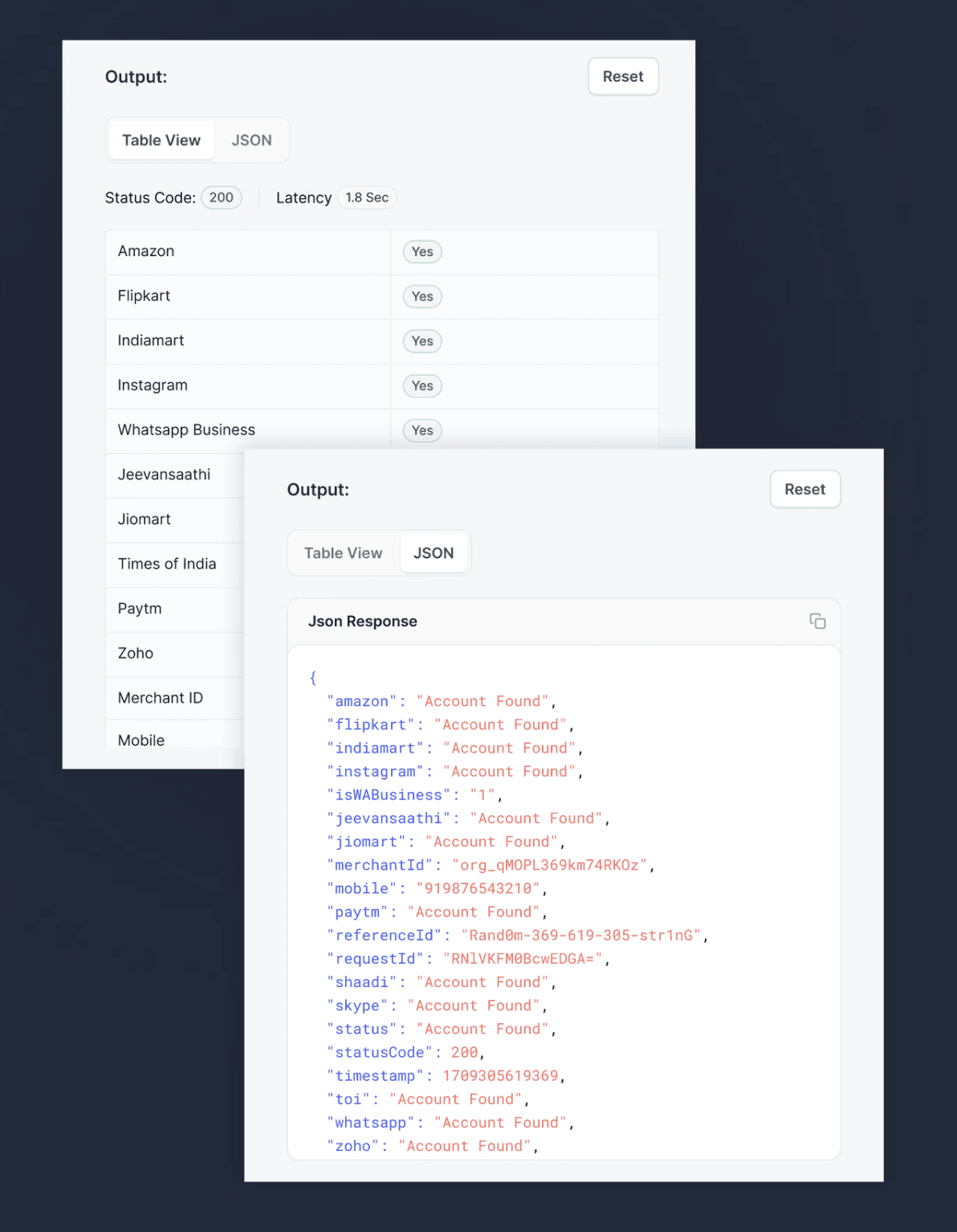
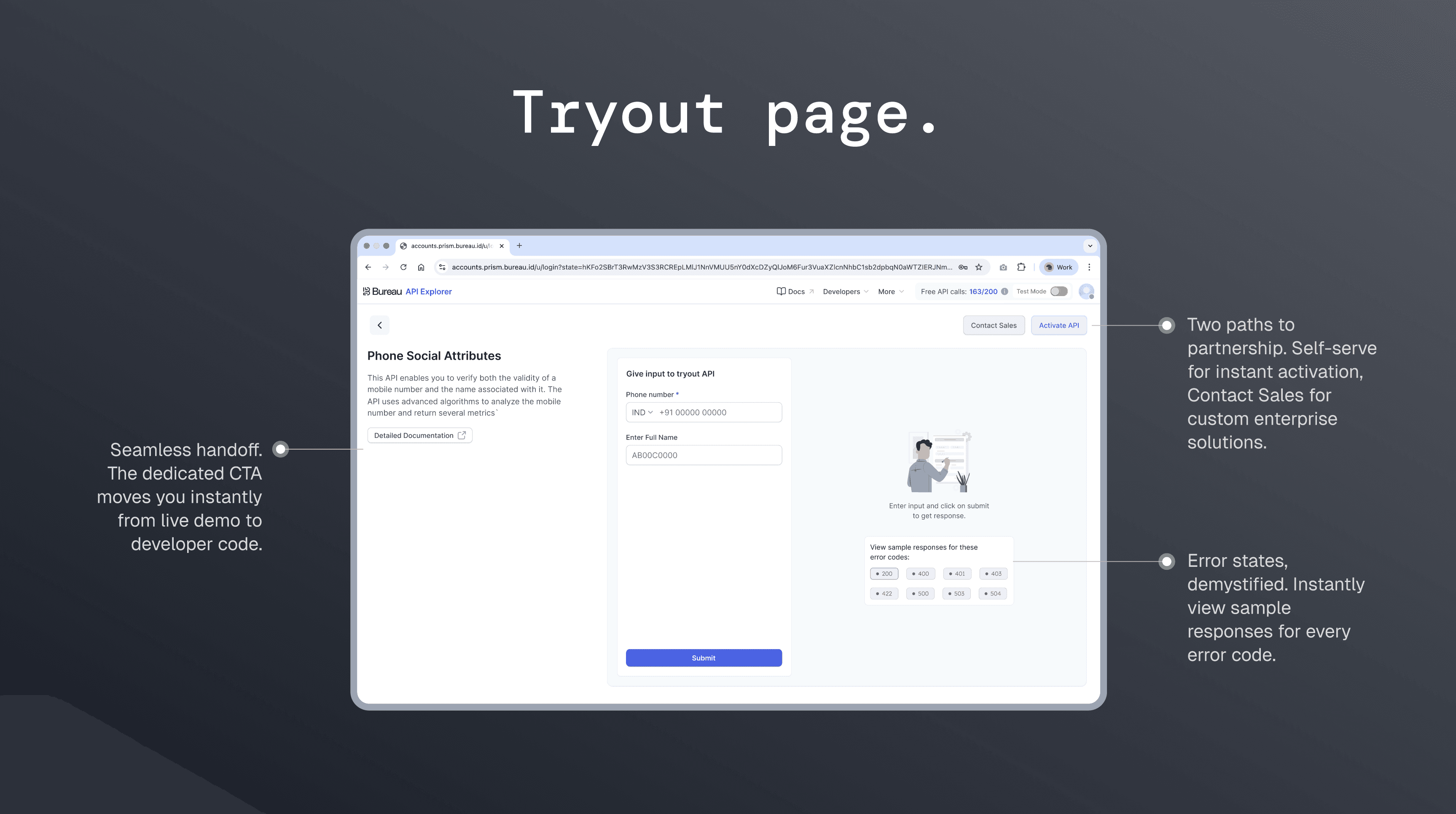
A focused testing environment. The left side provides a clear explanation of the API’s purpose and requirements, while the right side becomes the live tryout panel where users can input data and instantly view real-time responses.
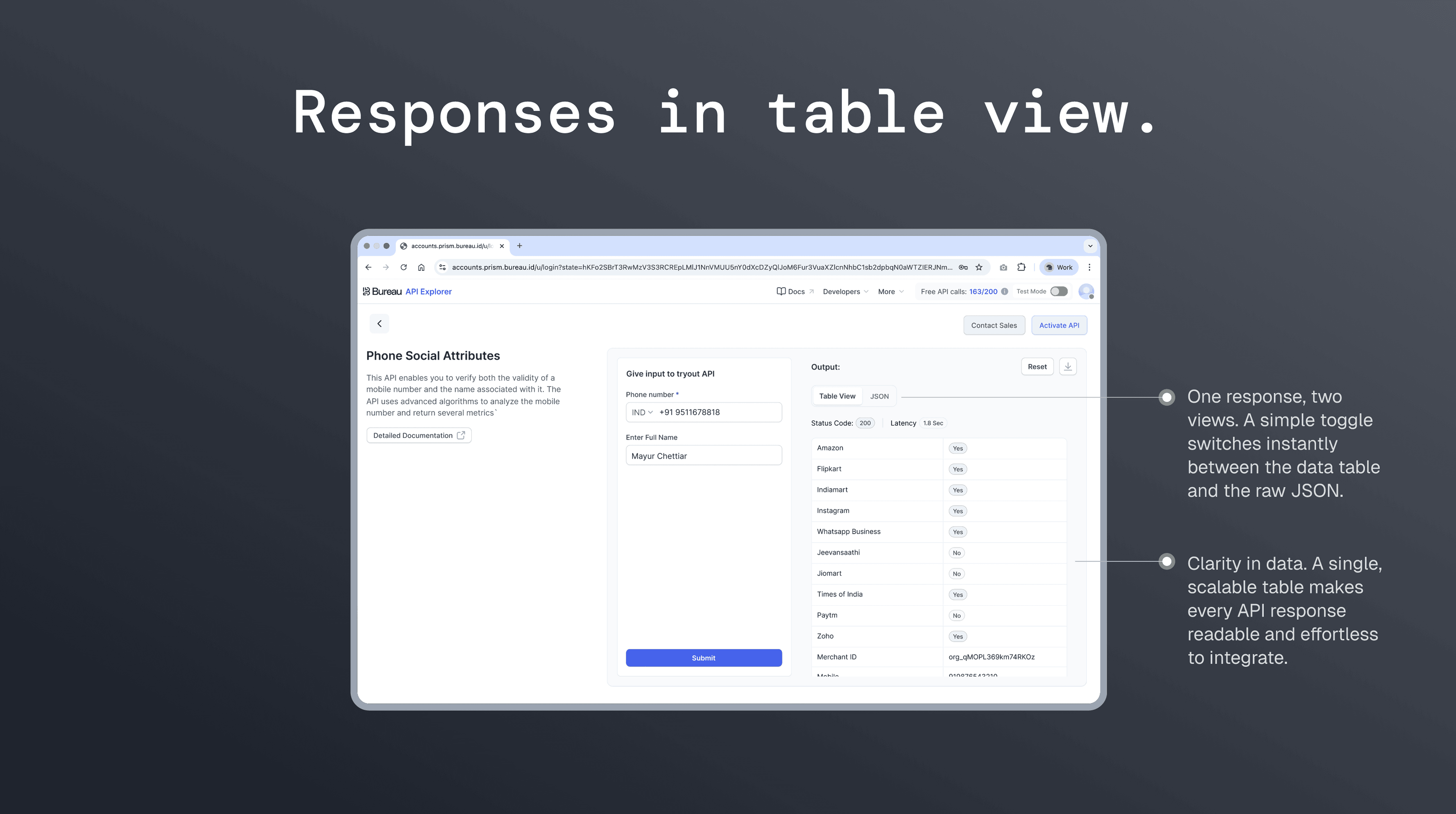
A simple toggle lets users switch between a clean table view and raw JSON, making every API response easy to read, compare, and understand.
In conclusion, this redesign demonstrated the impact of simplifying complexity, aligning decisions with user needs, and prioritizing clarity across the explorer. While there were opportunities to deepen research and broaden scalability earlier, the strategic focus on speed and usability helped unlock adoption and move the product forward with confidence.