Fraud Prevention & Compliance
Re-thinking the workflow builder for improved conversions and customer experience.
Re-thinking the workflow builder for improved conversions and customer experience.
Re-thinking the workflow builder for improved conversions and customer experience.
Bureau is a company focused on creating an ecosystem of trust and security within consumer, BFSI, and crypto applications. The plan was to revamp the workflow builder to make it easier to use and, in turn, help convert more clients.
Bureau is a company focused on creating an ecosystem of trust and security within consumer, BFSI, and crypto applications. The plan was to revamp the workflow builder to make it easier to use and, in turn, help convert more clients.
Bureau is a company focused on creating an ecosystem of trust and security within consumer, BFSI, and crypto applications. The plan was to revamp the workflow builder to make it easier to use and, in turn, help convert more clients.
Clarity came back, profits followed.
Clarity came back, profits followed.
Clarity came back, profits followed.
Clients came back to the company
Increase in cURL copy activity after completion.
New prospects acquired after the redesign.
Analysts, Fraud Risk Managers, Compliance Managers, Developers
Product & Visual Designer
Chatgpt, Figma, Jira, Google Meet
User Interviews, Journey Map, Competitor Analysis, Wireframes, Design Reviews, UI Design, Usability Testing
Users reported that the workflow module feels unclear, complex, and inefficient. The design has a steep learning curve and doesn’t align well with user needs, lacking an intuitive flow to guide them through creating workflows smoothly.
Furthermore, the onboarding process, exploration of capabilities, workflow creation process, and testing are not as user-friendly as they could be.
UX issues had led to a need for a redesign of the workflow to improve user experience, efficiency, and overall satisfaction.
We conducted user interviews to gather feedback and uncover workflow pain points. These insights clarified where the experience can be made more intuitive and now form the foundation of our redesign, giving us a fresh perspective on why and how to improve the workflow.
Understanding participants’ backgrounds, daily workflows, and tools.
Understanding participants’ backgrounds, daily workflows, and tools.
Understanding participants’ backgrounds, daily workflows, and tools.
Seeing the full process and how they use the platform.
Seeing the full process and how they use the platform.
Seeing the full process and how they use the platform.
Hearing real client stories for context.
Hearing real client stories for context.
Hearing real client stories for context.
Learning how they make decisions around capabilities, tags, and conditions.
Learning how they make decisions around capabilities, tags, and conditions.
Learning how they make decisions around capabilities, tags, and conditions.
Gathering suggestions to improve feature experience.
Gathering suggestions to improve feature experience.
Gathering suggestions to improve feature experience.
These were the benchmarks we set before starting the project to ensure it would deliver real business value.
User learning scores from post-onboarding.
Frequency and success rate of finding capability searches based on location, industries, and use cases.
Usage rate of the search feature and capabilities panel.
Number of user-implemented use cases/capabilities.
Frequency of correctly configured capabilities.
Number of users viewing capability details (description, input, output, configurations).
The number of users viewing integration steps with the cURL command and workflow documentation.
The number of times workflow was tested and validated using the in-editor option before integrating with code.
The number of successful troubleshooting attempts guided by error messages.
The number of error messages triggered and successfully resolved by users.
Reduction in workflow and transaction switching during testing.
Number of in-editor workflow tests before code integration.
Number of successful troubleshooting attempts based on error messages.
Number of errors triggered and resolved by users.
Reduced workflow and transaction switching during testing.
Based on the user interviews, we mapped out the User Journey for our new design. We focused on creating an intuitive flow that meets users where they are and guides them through the process of creating workflows smoothly.
1. Discover Bureau.id
Touchpoint: Marketing channels, referrals, website
Pain Point: Difficulty finding relevant information
User Question: What does Bureau.id offer for my business?
1. Discover Bureau.id
Touchpoint: Marketing channels, referrals, website
Pain Point: Difficulty finding relevant information
User Question: What does Bureau.id offer for my business?
1. Discover Bureau.id
Touchpoint: Marketing channels, referrals, website
Pain Point: Difficulty finding relevant information
User Question: What does Bureau.id offer for my business?
2. Signing Up
Touchpoint: Sign-up form, documentation
Pain Point: Confusing sign-up process
User Question: How do I sign up? Where's the documentation?
2. Signing Up
Touchpoint: Sign-up form, documentation
Pain Point: Confusing sign-up process
User Question: How do I sign up? Where's the documentation?
2. Signing Up
Touchpoint: Sign-up form, documentation
Pain Point: Confusing sign-up process
User Question: How do I sign up? Where's the documentation?
Read Overview
Touchpoint: Documentation content
Pain Point: Overwhelming information
User Question: What are the key concepts?
Read Overview
Touchpoint: Documentation content
Pain Point: Overwhelming information
User Question: What are the key concepts?
Read Overview
Touchpoint: Documentation content
Pain Point: Overwhelming information
User Question: What are the key concepts?
Workflow Components
Touchpoint: Workflow documentation
Pain Point: Complex terminology
User Question: How do these components apply to KYC Onboarding?
Workflow Components
Touchpoint: Workflow documentation
Pain Point: Complex terminology
User Question: How do these components apply to KYC Onboarding?
Workflow Components
Touchpoint: Workflow documentation
Pain Point: Complex terminology
User Question: How do these components apply to KYC Onboarding?
Study KYC Onboarding
Touchpoint: Examples and use cases
Pain Point: Unclear examples
User Question: How can I customize examples for my needs?
Study KYC Onboarding
Touchpoint: Examples and use cases
Pain Point: Unclear examples
User Question: How can I customize examples for my needs?
Study KYC Onboarding
Touchpoint: Examples and use cases
Pain Point: Unclear examples
User Question: How can I customize examples for my needs?
Custom KYC Workflow
Touchpoint: Platform interface
Pain Point: Complex interface
User Question: How do I create a custom workflow?
Custom KYC Workflow
Touchpoint: Platform interface
Pain Point: Complex interface
User Question: How do I create a custom workflow?
Custom KYC Workflow
Touchpoint: Platform interface
Pain Point: Complex interface
User Question: How do I create a custom workflow?
Test Workflow in Sandbox
Touchpoint: Sandbox environment
Pain Point: Testing difficulties
User Question: How do I test my workflow?
Test Workflow in Sandbox
Touchpoint: Sandbox environment
Pain Point: Testing difficulties
User Question: How do I test my workflow?
Test Workflow in Sandbox
Touchpoint: Sandbox environment
Pain Point: Testing difficulties
User Question: How do I test my workflow?
Integrate Workflow
Touchpoint: Integration process
Pain Point: Compatibility issues
User Question: How do I integrate workflows into systems?
Integrate Workflow
Touchpoint: Integration process
Pain Point: Compatibility issues
User Question: How do I integrate workflows into systems?
Integrate Workflow
Touchpoint: Integration process
Pain Point: Compatibility issues
User Question: How do I integrate workflows into systems?
Monitor and Optimize
Touchpoint: Analytics, dashboards
Pain Point: Data interpretation challenges
User Question: How can I optimize workflows based on data?
Monitor and Optimize
Touchpoint: Analytics, dashboards
Pain Point: Data interpretation challenges
User Question: How can I optimize workflows based on data?
Monitor and Optimize
Touchpoint: Analytics, dashboards
Pain Point: Data interpretation challenges
User Question: How can I optimize workflows based on data?
Drawing from user interviews and journey mapping, we created detailed personas that clarified our target users and their needs.
I’m just trying to understand the basics of the platform, and I really need a simple, reassuring onboarding. I’m not fully confident about the technical complexity yet, so I depend a lot on clear introductory documentation to help me get started.
Swipe the card
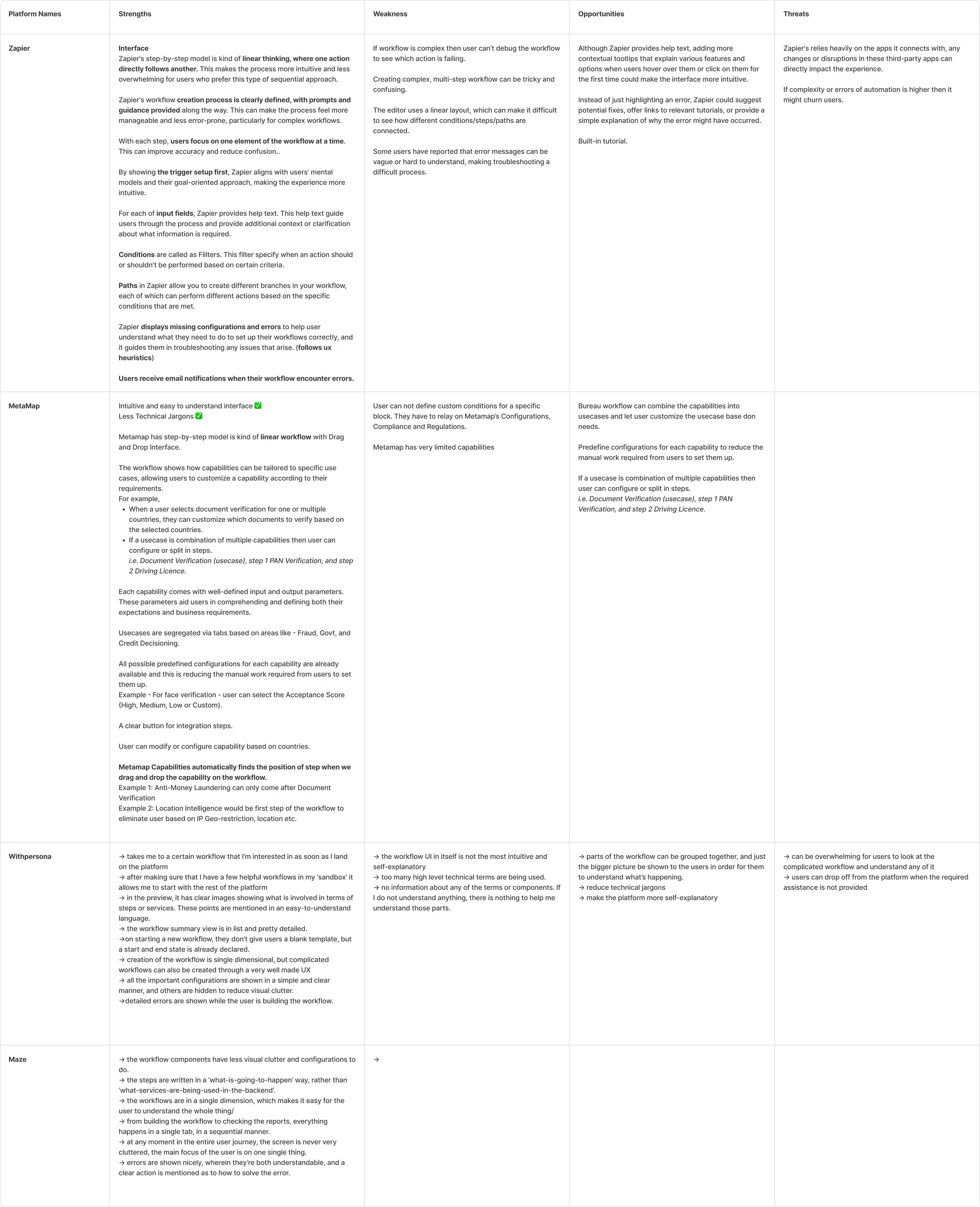
We studied the workflows of major players like Onfido, WithPersona, Metamap, Zapier, Tines, Maze, Primer.io, and Pipedream. We learned from their strengths and weaknesses to refine our own workflow.
We learned a lot from their approaches and came away with solid ideas for our own.
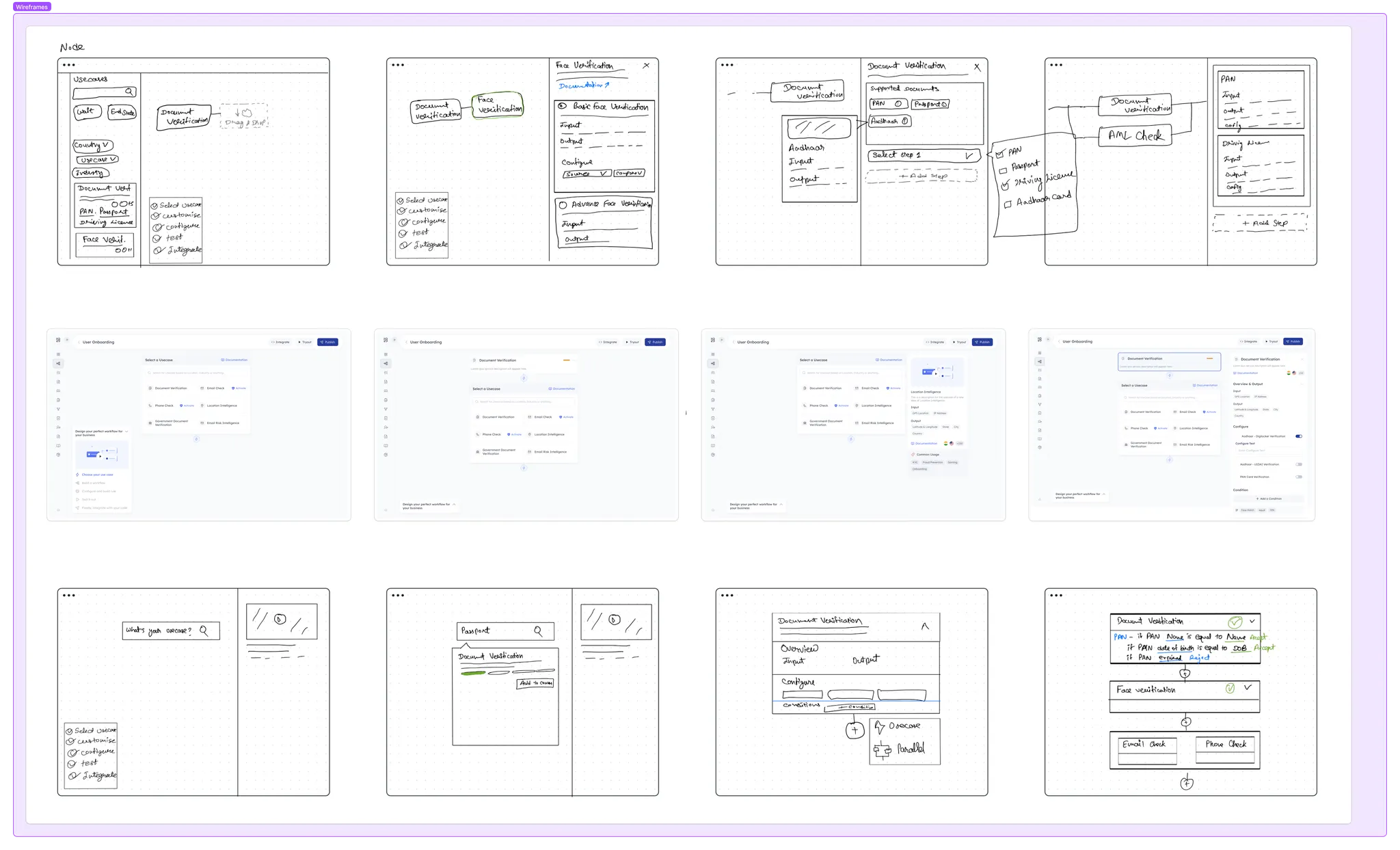
We created rough wireframe sketches to kickstart the redesign and planned to iterate on those concepts.
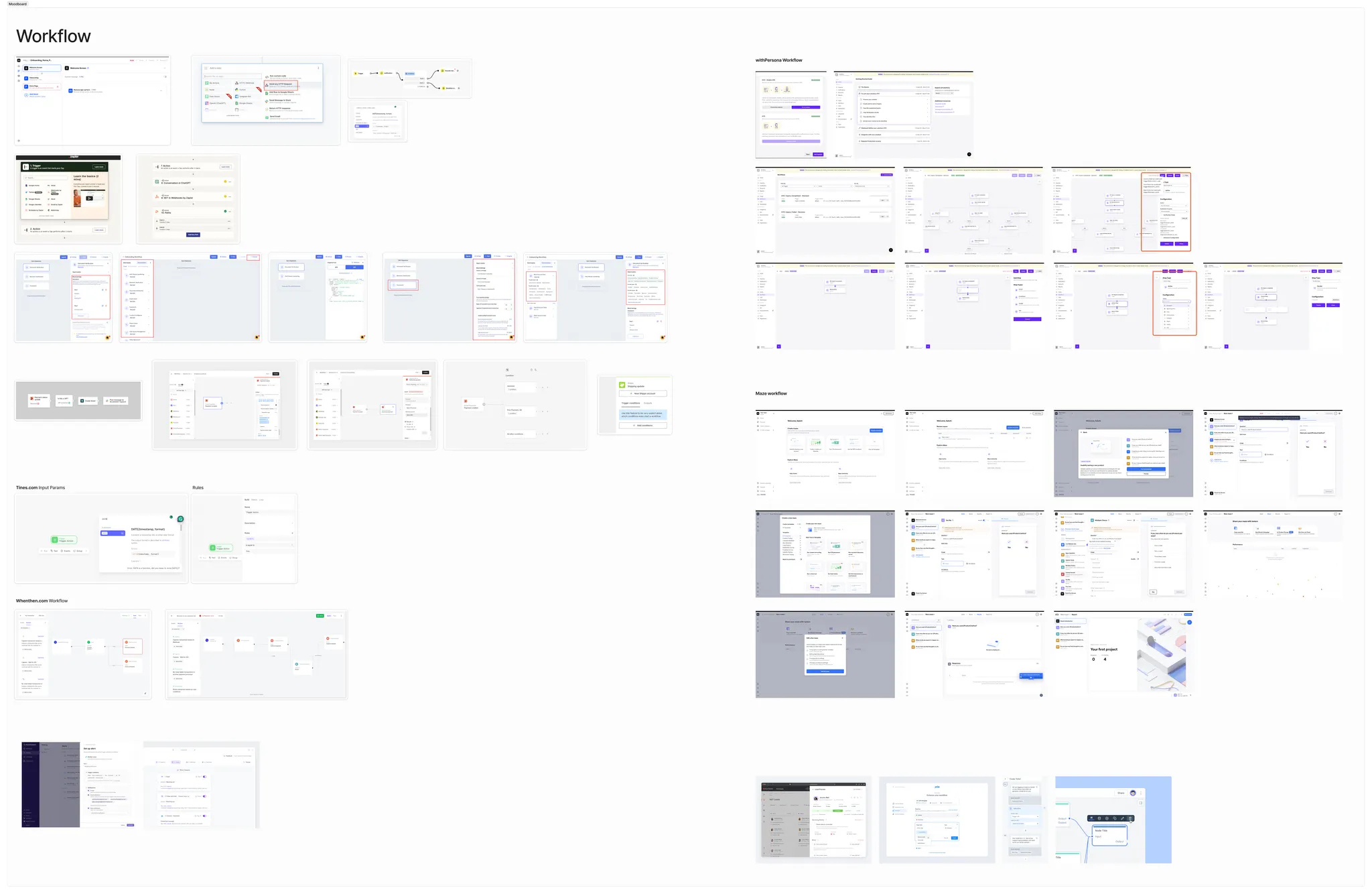
To nail down the visual style for the redesign, we put together a moodboard and asked for feedback on the overall aesthetic direction.
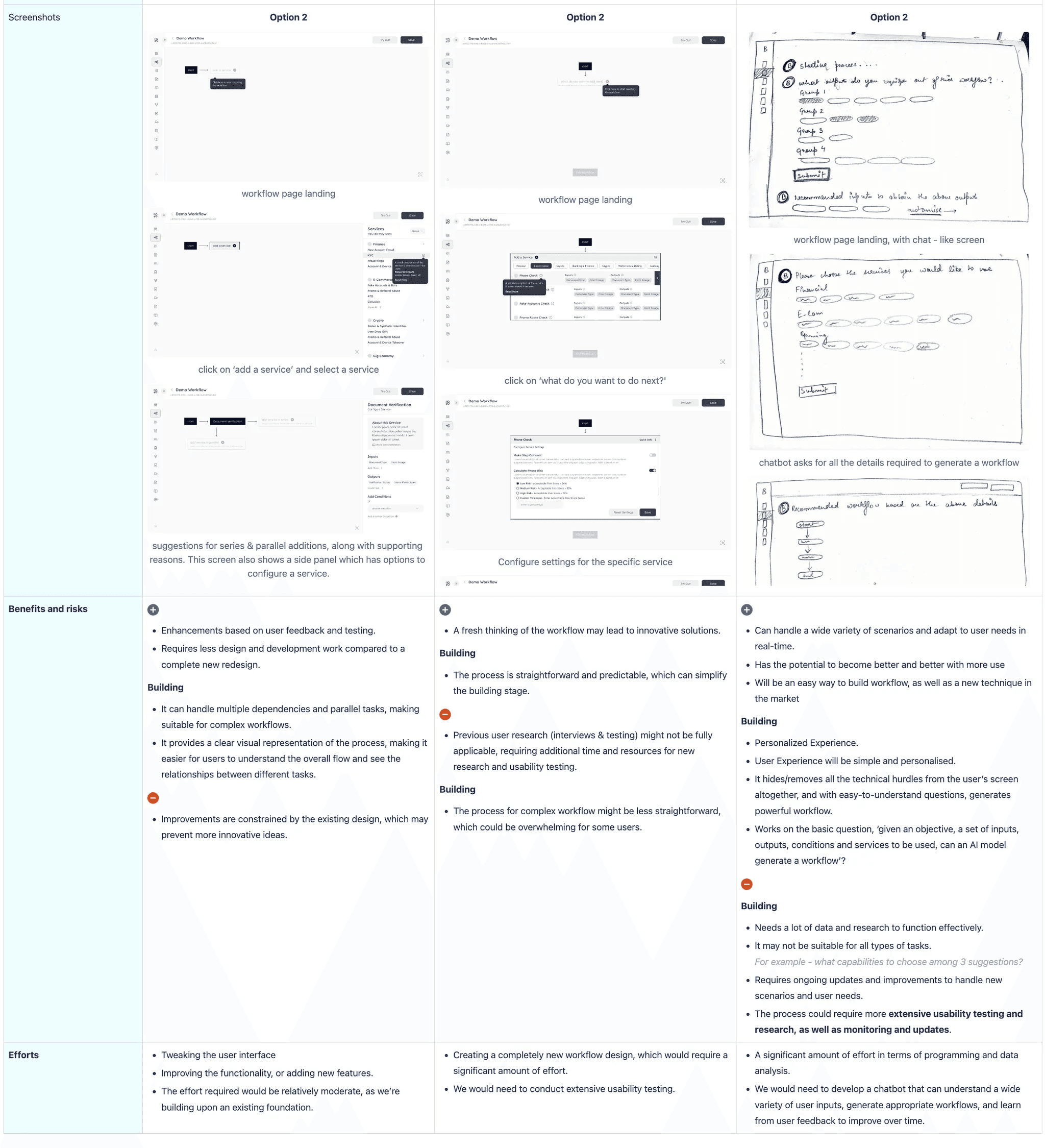
Workflow Redesign Approaches
Workflow Redesign Approaches
Workflow Redesign Approaches
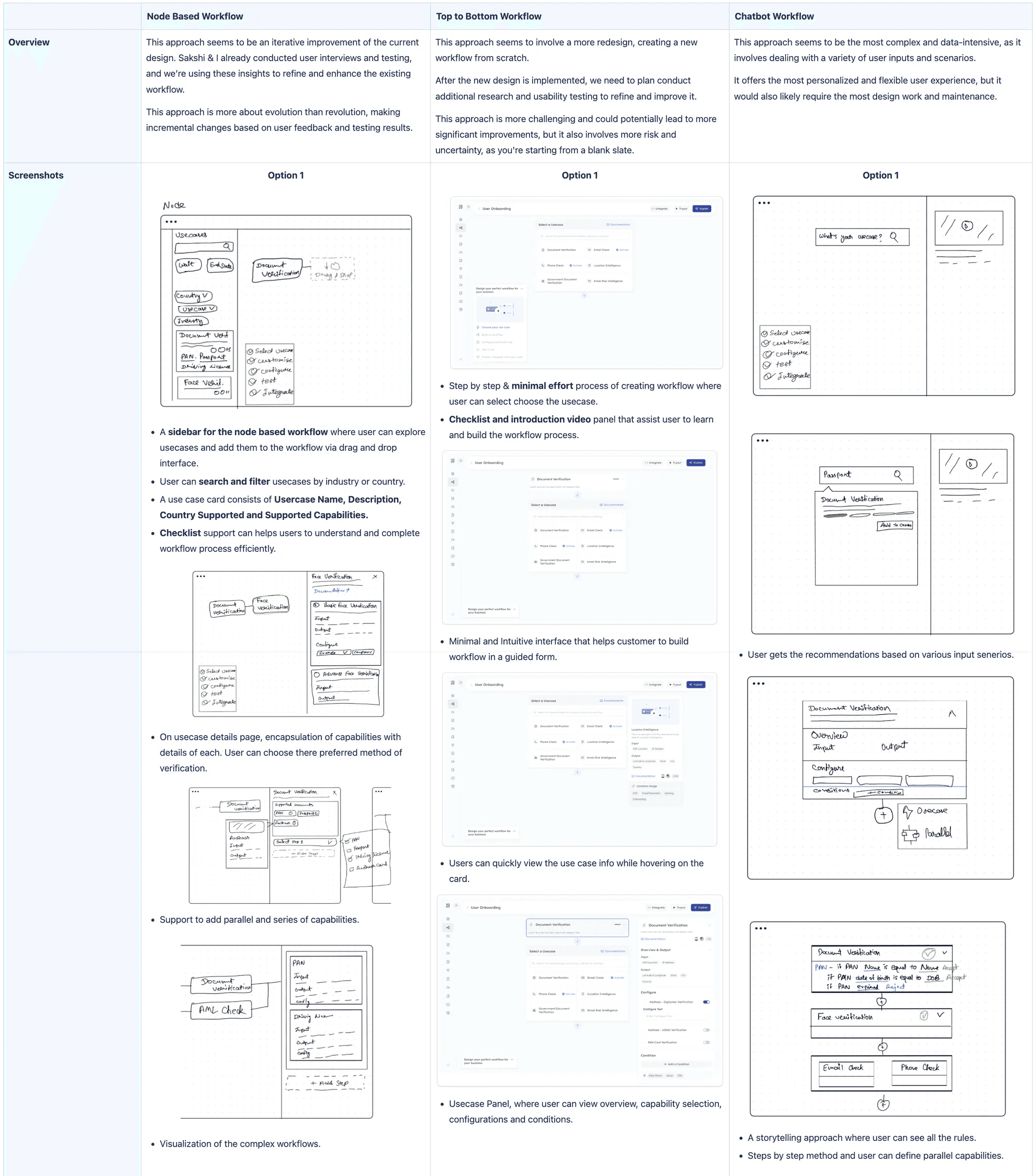
We compared three redesign directions: the Node-Based Workflow, which let us make quick iterative improvements; the Top-to-Bottom Workflow, which offered a full fresh redesign but required heavy effort; and the Chatbot Workflow, the most intelligent option but also the most complex to build and maintain.
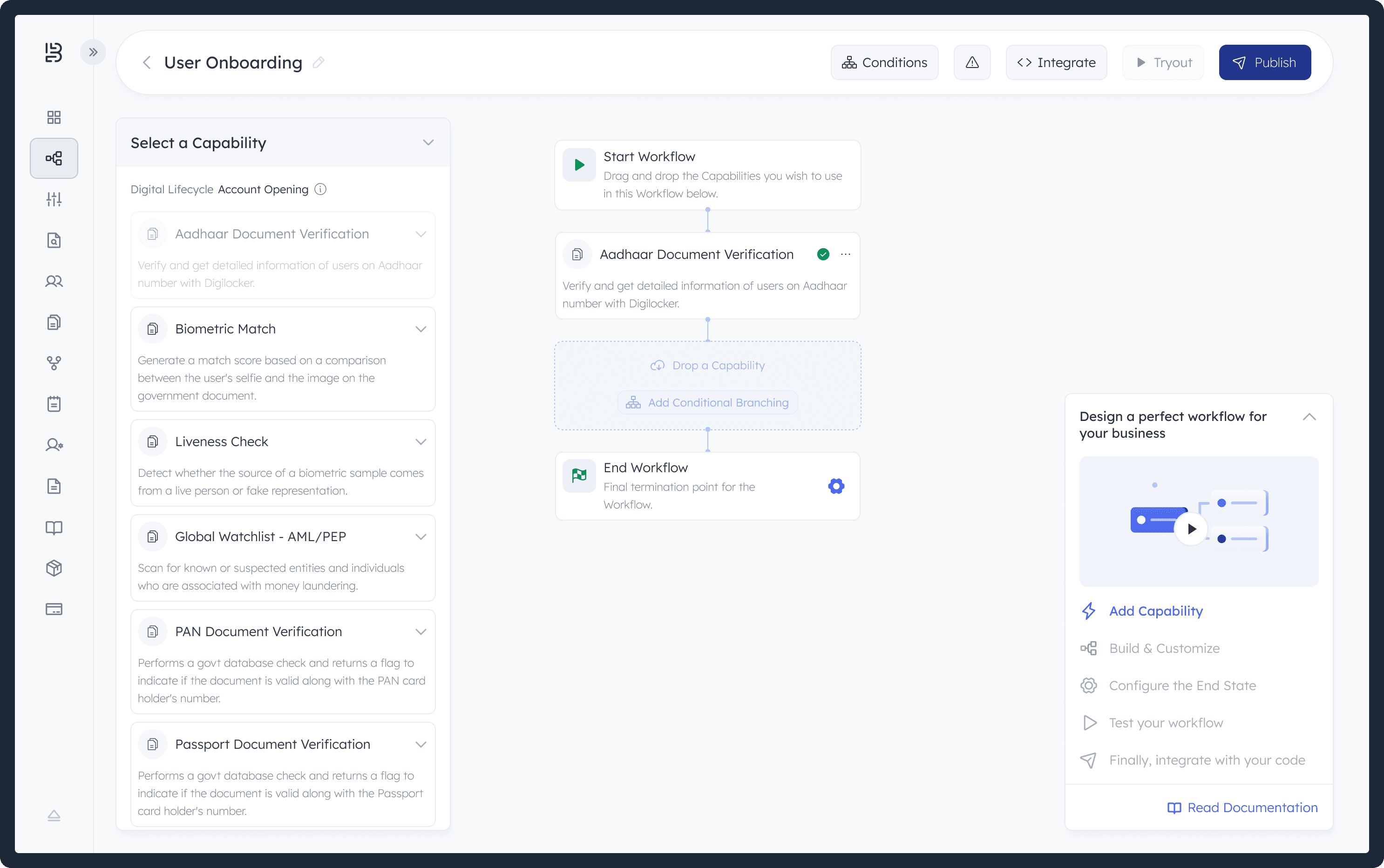
We believe this redesign solves key pain points and delivers a more intuitive, efficient experience.
Improved Onboarding: Clear guidance and interactive tutorials make it easy for new users to get started.
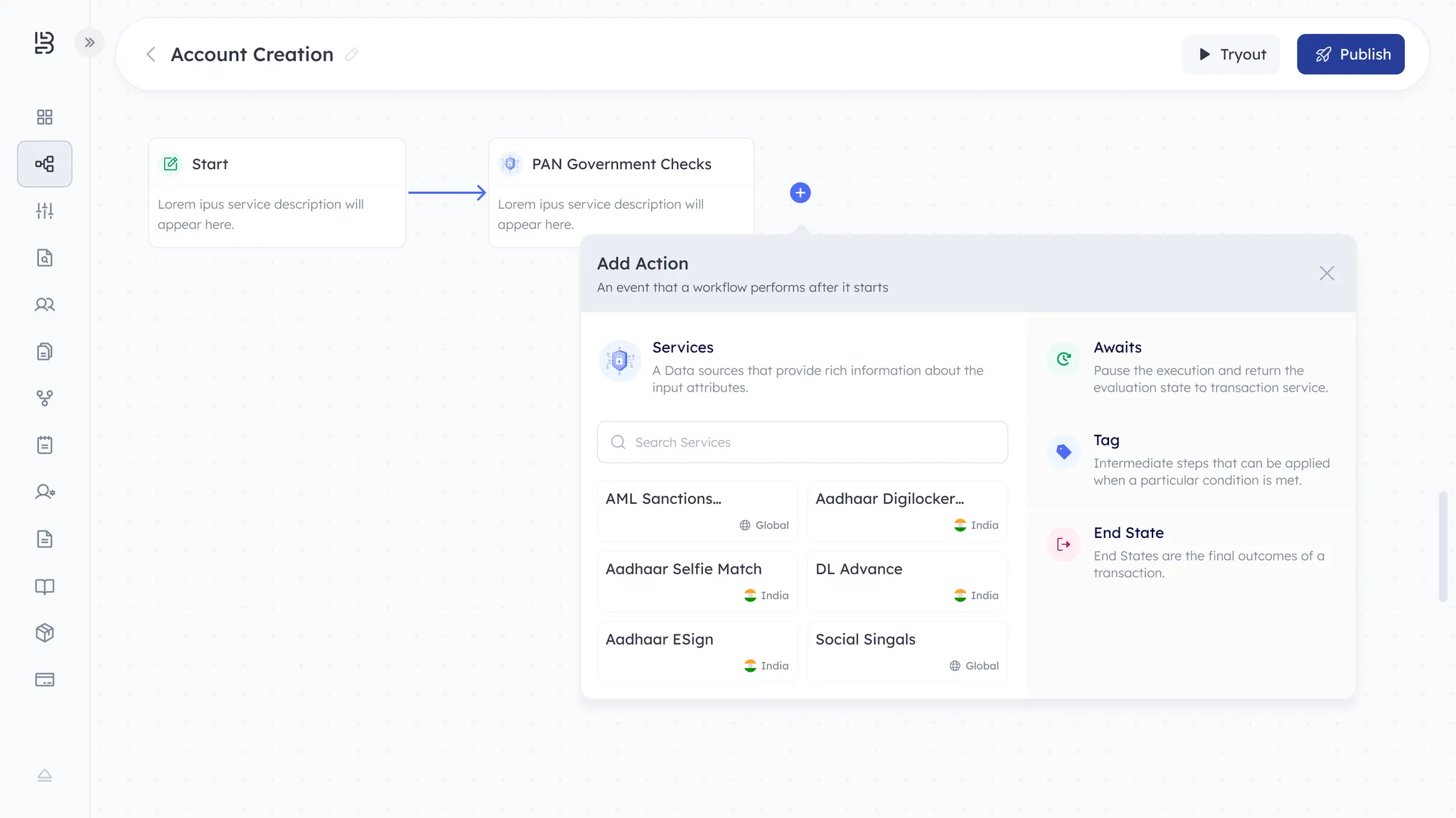
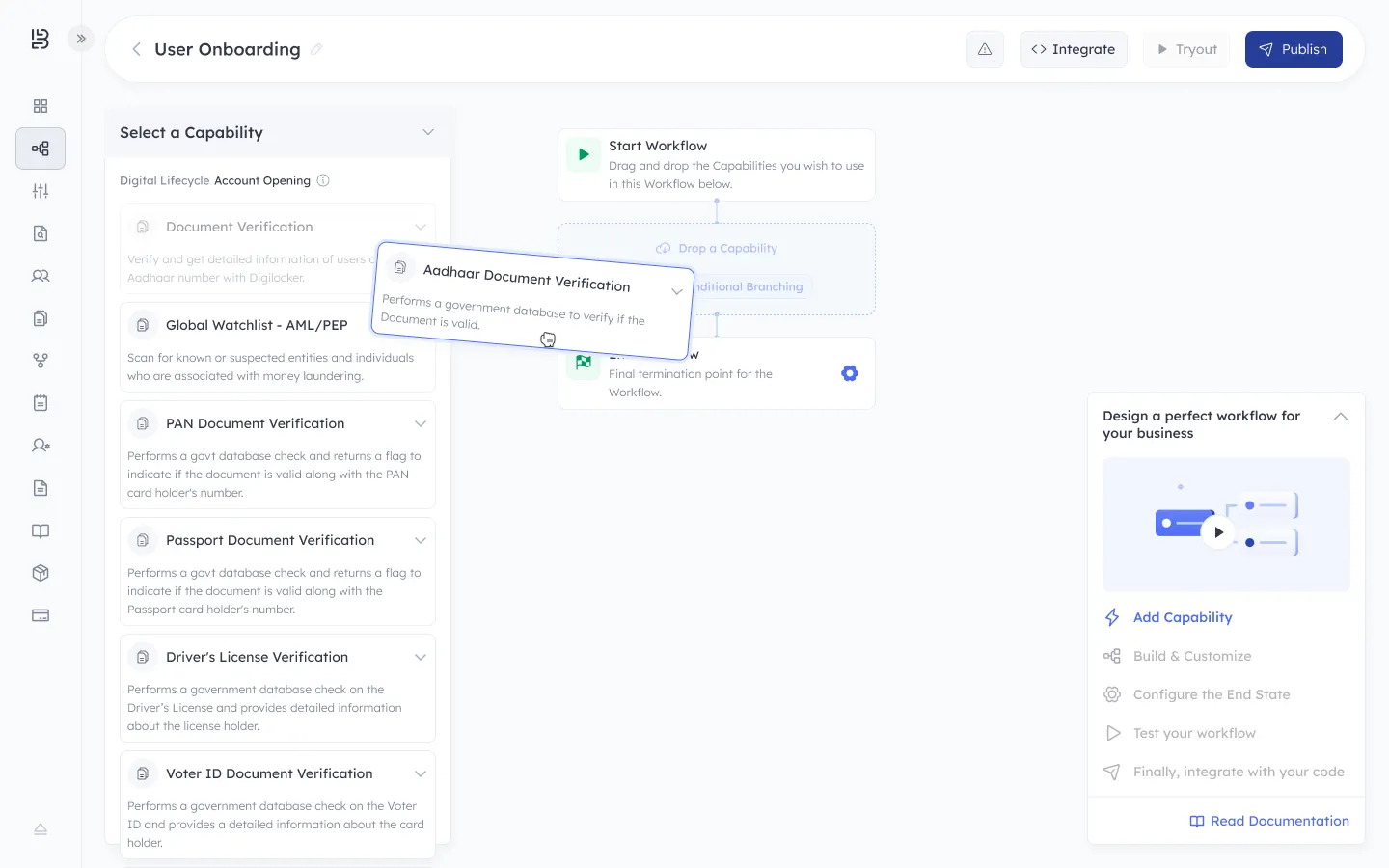
Smarter Workflow Builder: A simpler, drag-and-drop builder with real-time error checks helps users create workflows effortlessly.
Better Testing & Debugging: Enhanced tools let users validate and refine workflows before integration.
Simplified Integrations: A cleaner, step-by-step integration flow supports multiple platforms with ease.
We reviewed real user feedback after completing the redesign and used those insights to refine the workflow even further.
We redesigned Bureau’s workflow module through an eight week, user focused process involving interviews, testing and competitor analysis. By identifying major pain points such as complexity, unclear decision flows and limited visibility, we created a more intuitive, flexible no code workflow builder that is easier to learn, faster to use and better aligned with real user needs.